 CHAINZERO
Jump to a section5 short sections
Start with the hand you want to understand
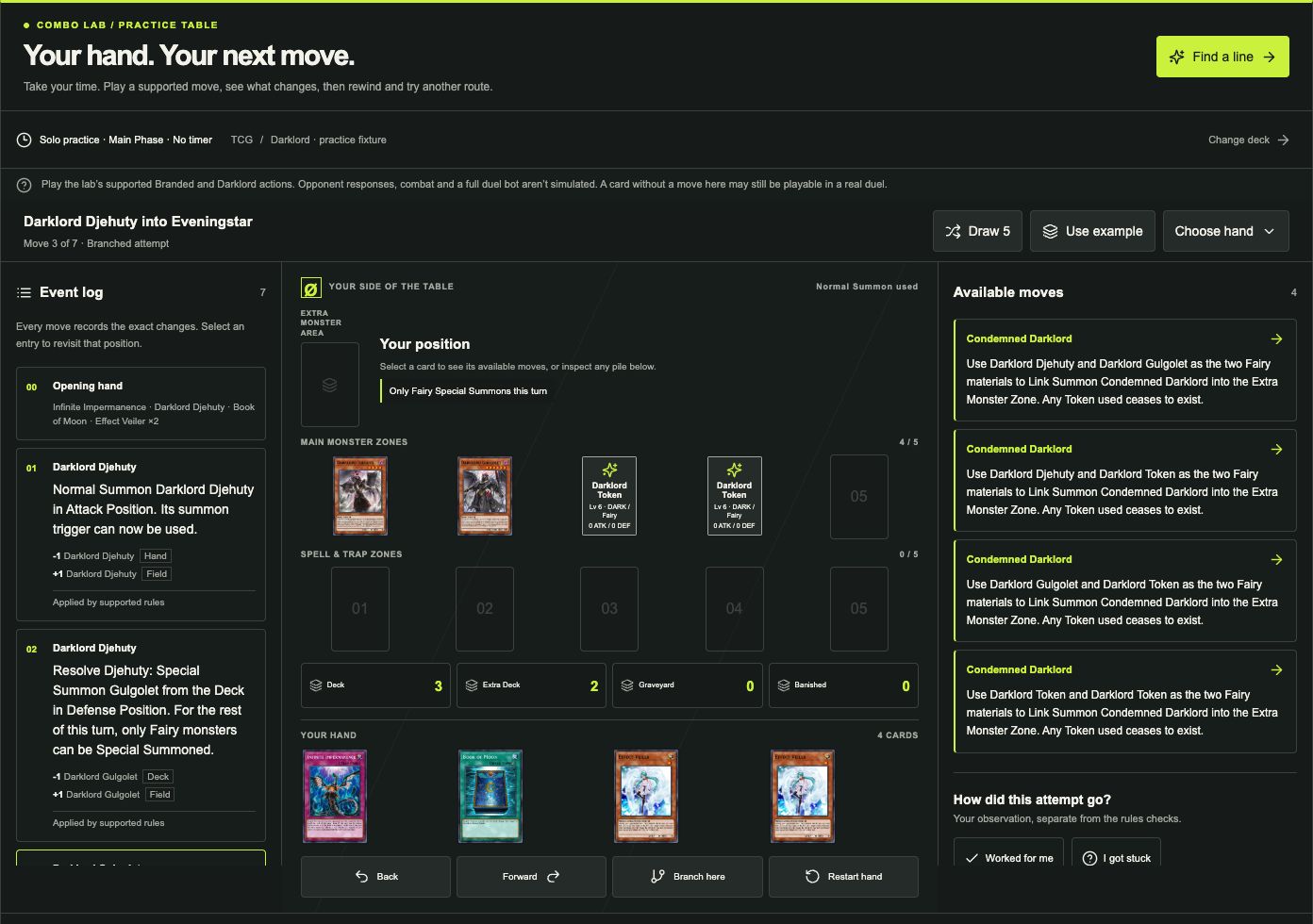
- Sign in with an approved early-tester account. Open Deck, select your saved deck, then choose Combo Lab. The Practice board opens first.
- Choose Use example for a selected practice hand, Draw 5 for a random hand, or Choose hand to pick up to five cards from that Main Deck.
- Select a card to inspect it. Choose an available action in Moves to apply it; the board and Event log update together.
For a first attempt, start with Use example. That hand is chosen to demonstrate a supported route; it isn’t a random draw or evidence of how often your deck opens it. If you don’t have a deck yet, choose Try a ready deck and read its binder confirmation.
Go back to the choice, not all the way to the start
Suppose you want to compare two available moves from the same position. Use Back, or select the earlier entry in the Event log, to return to it. Forward replays the next recorded move.
Select Branch here to keep a separate attempt from that position. Choosing a new move while viewing the past also keeps the earlier route as its own attempt. Restart hand starts again with the same opening cards and preserves the previous attempt.
- PlayChoose a supported action.
- RewindReturn to a recorded position.
- BranchTry another choice. Keep both attempts.
On a phone, use the Moves, Event log and Cards tabs to switch panels. There’s no turn timer, so you can read a card before making the next move.
Keep track of what you already tried
Use Worked for me or I got stuck to mark your own observation. Select a card before adding a note to attach that note to it, then choose Add to event log.
Open Previous attempts to revisit recent hands and branches. The app keeps up to 20 recent attempts per deck in this browser. This practice history is local; account cloud saving does not sync it to another device. Check the save status before closing the tab, and keep it open if a save error appears.
Those marks are your testing notes, not a rules verdict or a measured success rate.
Ask for a route when you need a starting point
Find a line explores a suggested route from the chosen opening hand. When a draft is available, select Practice this line to load its recorded moves into the board and inspect them at your own pace.
Playing local moves, reading the log and replaying an attempt use no analysis allowance. Online Find a line requests use the shared allowance shown in your account.
Read the check labels separately from the board: Not checked means a review answer was unavailable or missing. Uncertain check or Inconclusive check means an answer arrived without enough support for a verdict. Conflict found flags a move for investigation. A successful authored replay only shows that the lab can reproduce its own supported actions.
When a card has no available move
This first board models selected Branded and Darklord actions during your own Main Phase. It doesn’t simulate an opponent, battles or every card effect. A card without a move in this lab may still be playable in a real duel; more cards in the catalog does not automatically add their effects to practice.
Use the board to compare supported choices from one hand. For the different question of how often you’ll draw a starter, use Opening Odds with a 40–60-card Main Deck and read the opening-hand guide.
Access to this board requires manual early-tester approval. If your request is pending, you can keep browsing cards and building local decks while you wait. Request early access, or open the app if you’re already approved.
About these steps
Interface labels, access requirements, practice-history limits and supported behavior checked against the CHAINZERO implementation. This walkthrough describes app controls, not an independently verified card combo.
Experimental solo practice. Authored engine checks, optional online reviews and your observations are separate sources of information; none is an official ruling.
Interface checked October 6, 2026. Corrections: guides@chainzero.co.